
I checked my own JAMB slip three different times the week before slip printing opened, and the venue box stayed empty every single time. My stomach dropped a little each time, even though I’d registered properly and paid on time. That blank box doesn’t tell you anything on its own, and that’s the actual problem with most advice you’ll find: it just says “wait,” without telling you how to check if you’re the kind of candidate who’s fine waiting, or the kind who has a real issue sitting underneath it.
So let’s fix that. Below is a simple way to split a normal pre-allocation blank from an actual fault in your registration.
Key takeaways
- A blank venue field before slip printing opens is normal for almost everyone. JAMB releases centre, date, and time together, all at once, through the slip printing portal.
- A blank field that stays empty after slip printing has opened for your exam type is the real warning sign, not before.
- Four things decide whether you’re in the normal group or the flagged group: registration completion status, payment confirmation, biometric capture success, and whether the slip portal has actually opened for your candidate type (main UTME, mock, or supplementary).
- Profile code errors, NIN mismatches, and biometric capture failures are the most common reasons a real candidate ends up with no centre, and each one has a different fix.
- Only an accredited CBT centre or a JAMB office can fix these problems. A cyber café cannot touch your registration data.
The direct answer: when a blank venue is normal, and when it isn’t

Here’s the part nobody spells out clearly enough. JAMB doesn’t drip-feed your exam details. Your centre, date, and reporting time all show up together, in one go, the moment the slip printing portal opens for your candidate type. Before that moment, an empty field means nothing went wrong. JAMB assigns exam centres after registration closes, because centres are allocated based on capacity, candidates are distributed across multiple dates, and logistics and security planning must be finalised. That’s not an excuse JAMB made up to cover a slow system. It’s how a board handling millions of candidates plans hall capacity, staff numbers, and security around a single town.
So the real question isn’t “why is my field blank.” It’s “has my slip portal even opened yet, and if it has, am I still blank.” Those are two completely different situations, and treating them the same is exactly where most JAMB advice goes wrong.
Run through this short check first, before you panic:
- Has JAMB announced slip printing for your candidate type? Main UTME, mock, and supplementary candidates get separate announcements and separate portal links. If your type hasn’t opened yet, a blank field is expected. Nothing is wrong.
- If it has opened, has it opened for everyone, or in batches? JAMB has a history of activating slip printing gradually rather than for every candidate at once, so a slow rollout can look like an individual problem when it’s actually a timing issue.
- Is your registration fully complete, with biometric capture done at an accredited centre? If any step in your registration was skipped, partial, or done outside an accredited centre, that’s a different problem from a timing delay, and waiting longer won’t fix it.
If you answered “no” to the first question, stop reading the panic articles and go do something useful with your time. If you answered “yes” to the first two and you’re still blank, move to the diagnostic table below.
The centre allocation diagnostic: pre-release blank vs. genuine fault
This is the tool that’s missing from most of what’s written on this topic. I’m calling it the Centre Status Check, and it works by testing four conditions against where you actually are in the process.
| Condition you’re checking | What it looks like if you’re fine (pre-release) | What it looks like if something’s actually wrong |
|---|---|---|
| Slip portal status for your candidate type | Portal hasn’t opened yet, or just opened and is rolling out gradually | Portal has been open for days for your candidate type, others in your batch can see their centres, you still can’t |
| Registration completion | You completed every step: profile code, e-PIN, biometric capture, subject and town selection, at an accredited CBT centre | You registered at an unaccredited centre, your session was interrupted before biometrics were captured, or you never finished selecting your exam town |
| Payment status | Payment confirmed and reflected in your profile, e-PIN used successfully | Payment shows as pending, failed, or unconfirmed days after you paid |
| Biometric and NIN match | Fingerprints captured cleanly, your name and details match your NIN exactly | Scanner couldn’t read your fingerprint properly, or your bio-data doesn’t match your NIN record |
If every row on your side lines up with the “fine” column, you’re in the normal pre-release group. Go print your slip once the portal opens for your type and stop refreshing the page every hour. If even one row lines up with the “wrong” column, you’re dealing with a fault that needs a specific fix, not more waiting.
Why waiting is bad advice in some of these cases
Most JAMB content tells every reader to “just wait for the slip.” That’s correct for the biggest share of candidates, but it’s bad advice for anyone sitting in the second column of that table, because waiting doesn’t fix a registration fault. It just delays the moment you find out, usually until it’s closer to exam day and your options for fixing it have shrunk.
Here’s the mechanism behind why each fault actually blocks centre allocation:
- Incomplete registration means JAMB’s system has no finished profile to assign a centre to. You can’t get allocated to a venue if the system still sees your registration as in progress.
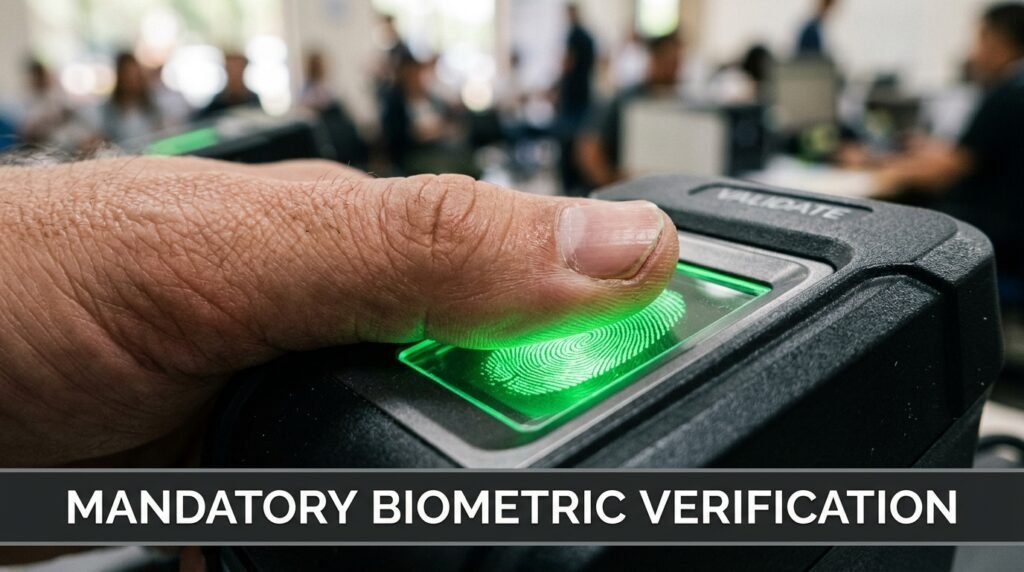
- Biometric capture failure matters because no candidate will be permitted to sit the examination if his or her biometrics is not verified, and the Board will not permit or process any examination without biometric verification. A centre assignment built on unverified biometrics is a problem JAMB would rather catch before exam day than during it.
- NIN mismatch stalls things because your registration is tied to your national identity record. If your name or details on the JAMB profile don’t match your NIN exactly, the system flags that profile rather than pushing it through to allocation.
- Payment not confirmed means your e-PIN never properly closed the loop, so your registration technically isn’t finished even if you think you completed every screen.
What to actually do, step by step
If your situation falls into the “something’s wrong” column, here’s the order to work through it in. Don’t skip steps to save time, each one rules out a different cause.
- Log in to your JAMB profile (CAPS or e-Facility) and check your registration status directly. Don’t rely on memory of what you think you submitted. Look at whether every section shows as complete.
- Confirm your payment went through. Check whether your e-PIN was successfully used during registration, not just purchased.
- Visit the accredited CBT centre where you registered, not a cyber café. Avoid cyber cafés or unauthorized centers, as they cannot fix biometric errors. Only an accredited centre or a JAMB office can touch your actual registration data.
- Ask the centre staff to check your biometric and NIN status in the system, not just your printed slip. A printed registration slip from months ago tells you nothing about your current status.
- If your name, date of birth, or other bio-data doesn’t match your NIN, go to a NIMC enrolment centre first. If the mistake involves a mismatch between your JAMB details and your NIN record, you must visit an approved NIMC enrolment centre to correct the data first, wait for the update to reflect in the NIMC database, then proceed to a JAMB-accredited CBT centre for correction. JAMB can’t fix a NIN-side error from its own end.
- If your fingerprints genuinely can’t be read by the scanner, this isn’t treated as a disqualifying problem, it has its own official path. Candidates with biometric abnormality can only register and sit the examination at the JAMB National Headquarters, Abuja on the last day of the national examination calendar, and the Board will facilitate the travel expenses of the candidates concerned. That’s a real, named accommodation, not a workaround someone invented.
- Only after all of the above check out clean, wait for the slip portal to open for your type and check again.
Mock, main UTME, and supplementary slips are not the same portal
A mistake I see constantly is candidates checking the wrong portal and assuming their centre is missing. JAMB runs separate slip printing systems depending on what you registered for. Mock candidates print theirs through a dedicated mock slip portal, while supplementary or mop-up candidates use a different link entirely, one that only works for candidates JAMB has officially placed in the supplementary schedule, and if you were not notified by JAMB, you will not be able to access it. If you’re checking the supplementary portal without having been placed there, of course it shows nothing. That’s not a fault, that’s the wrong door.
Before you worry about a blank field, confirm you’re even looking at the correct portal for your candidate type.
Common traps that waste a candidate’s time
A few patterns show up again and again, and they cost candidates real time they could’ve spent fixing the actual problem.
- Refreshing the same portal for days without checking registration status first. If your registration has a real fault, refreshing changes nothing. Fix the underlying issue, then check the portal.
- Going to a cyber café to “sort out” a biometric or NIN problem. A cyber café can print a PDF for you. It cannot correct anything in JAMB’s system. Only accredited centres and JAMB offices can do that.
- Assuming a centre, once shown, can be changed by request. Once JAMB allocates and releases your centre on your slip, candidates generally can’t switch it on personal preference. Plan around the centre you get rather than hoping for a swap.
- Treating registration day’s printed slip as proof everything’s still fine. That slip only reflects your status at the moment you registered. Biometric or NIN issues can surface later in JAMB’s verification process, even if your day-of-registration slip looked complete.
A quick gut check before you contact anyone
Ask yourself these in order. The first “yes” tells you where you stand.
- Has slip printing opened for my exact candidate type yet? If no, stop here, you’re fine.
- Did I complete every registration step at an accredited centre, including biometrics? If no, that’s your starting point.
- Does my payment show as confirmed in my profile? If no, check that before anything else.
- Does my name and bio-data match my NIN exactly? If no, NIMC is your first stop, not JAMB.
Work through them in that order and you’ll know within a few minutes which category you’re actually in, instead of guessing for days.
If you’ve gone through every check above and your registration, payment, and biometrics all show as complete, and slip printing has genuinely opened for your candidate type, then go to an accredited CBT centre in person and ask them to pull up your status directly. Don’t keep checking the portal alone for another week. A five-minute conversation with someone who can see your actual profile beats another hundred refreshes of a page that can’t tell you why.
Discover more from EducationNGR
Subscribe to get the latest posts sent to your email.