
I sat in a CBT centre in Garki last registration season and watched a young woman discover, two screens before the end, that her NIN had a date of birth mismatch nobody had caught. The centre staff couldn’t fix it. She had to leave, sort it with NIMC, and come back. That moment is the whole reason this comparison exists. Most guides tell you registration happens at a centre. They don’t tell you what happens when something goes wrong inside that centre, or who is actually touching your data while you sit there.
So let’s set the record straight first, because there’s real confusion floating around: there is no option to register for JAMB from your phone or laptop at home. Every candidate, no exceptions, must show up in person at a JAMB-recognised location. What does change is which kind of location and how much control you have once you’re there. That’s the real choice, and it’s the one nobody breaks down properly.
Key takeaways
- JAMB has no remote, do-it-from-home registration. Every candidate registers in person, full stop.
- The real choice is between a regular accredited CBT centre (where centre staff drive the keyboard) and the self-service option at JAMB state offices and Professional Registration Centres, PRCs (where you operate the system yourself under supervision).
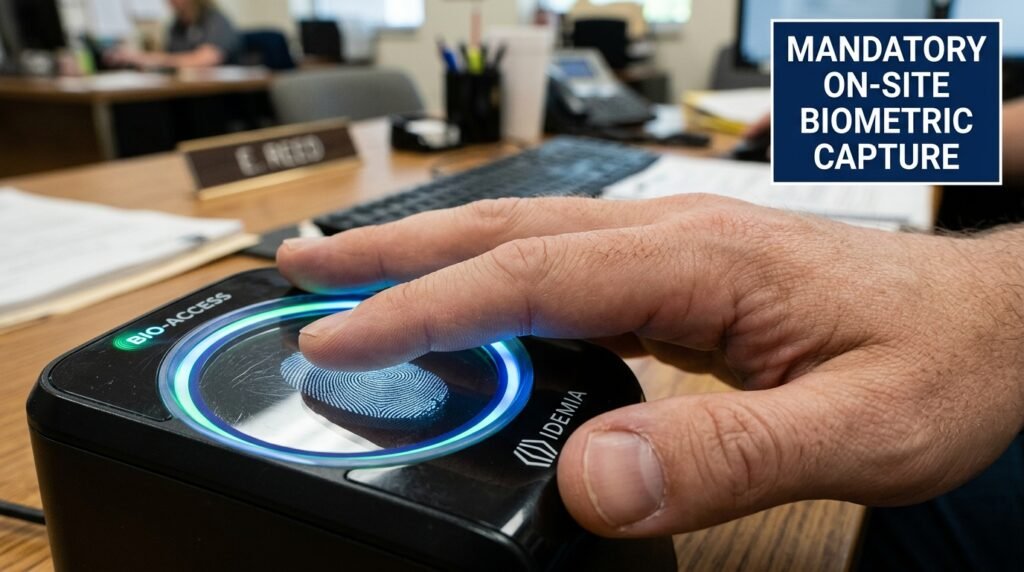
- Biometric capture, all ten fingerprints plus your photo, happens on-site either way. JAMB does not accept biometrics taken anywhere else, with one narrow exception for biometric abnormality cases.
- Self-service gives you direct control over data entry, which lowers typing-error risk, but it demands that you’re genuinely comfortable with a computer, since there’s no operator doing it for you.
- Group or school-based registration is banned everywhere. If your school tries to register an entire class as one block exercise, that’s against JAMB’s own rules.
- Errors after submission go through JAMB correction channels, not a redo. You don’t get a second form just because the first one has a mistake.
What “self-service” actually means at JAMB
Here’s where a lot of blog posts get sloppy. They throw around the phrase “self-registration” like JAMB just opened up a website where you fill your own form from your bedroom. That’s not what’s happening.
The self-service option is a setup inside JAMB’s own state offices and accredited Professional Registration Centres. You go there in person, same as anyone else. The difference is that, once you’re seated, you operate the computer system yourself instead of dictating your information to a centre staff member who types for you. JAMB describes this option as available specifically for computer-literate candidates. If you’re not confident using a mouse, navigating dropdown menus, and reading instructions on screen without help, this isn’t the lane for you, and that’s fine. The regular CBT centre route exists for exactly that reason.
Think of it less as “online registration” and more as “supervised, self-operated registration at a government location,” compared with “staff-operated registration at a licensed private centre.” Both still require your physical presence. Both still capture your fingerprints on-site. The gap is in who’s holding the mouse and reading the screen for you.
The side-by-side comparison: control, fees, biometrics, and error handling
This is the part most articles skip entirely. They’ll tell you both options exist, then move straight to “here’s how to register,” without ever laying out what actually differs once you’re in the chair. Below is a direct comparison across the four things that matter most when you’re deciding.
| Factor | Accredited CBT centre (regular route) | Self-service at JAMB office / PRC |
|---|---|---|
| Who enters your data | Centre staff member types on your behalf, reading your details aloud or from your documents | You type and navigate the system yourself, with staff present mainly to assist, not to operate |
| Location type | Licensed private cybercafé, school, or business centre approved by JAMB | JAMB state or zonal office, or an accredited Professional Registration Centre |
| Skill level needed | None. Centre staff handle the technical side | Reasonable comfort with computers, since you confirm and submit your own entries |
| Biometric capture | On-site, all ten fingerprints plus photograph, same as every channel | On-site, same standard, no difference in this step |
| Fee structure | Same JAMB e-PIN price nationwide, but centres may add a local service charge (this is where overcharging complaints usually come from) | Same JAMB e-PIN price; being at a government office removes the layer of a private centre’s added service charge |
| Error recovery during entry | You catch mistakes by listening carefully and asking the operator to re-read the screen before you confirm with your fingerprint | You see every field yourself in real time, which generally makes it easier to catch a wrong spelling or digit before final submission |
| Error recovery after submission | Goes through JAMB’s official correction process; the centre that made the error cannot just “redo” it for you | Same correction process applies; self-entry doesn’t bypass JAMB’s rules on corrections |
| Risk of human error from a third party | Higher, since someone else is interpreting and typing your information | Lower for typing slips, but you now carry full responsibility, since there’s no one to blame for a missed field |
| Best suited for | Candidates who want guided support, or who aren’t confident with computers | Candidates who are computer-literate and want direct control over what gets typed |
A few of these rows deserve more than a table cell, so let’s go through the ones that actually decide your choice.
Control over data entry: the detail that causes most registration regrets
If you’ve heard stories of candidates whose name got spelled wrong, or whose date of birth ended up transposed, this is almost always a data entry issue, not a system glitch. At a regular CBT centre, you’re relying on a staff member to correctly hear, read, and type your details. Busy season means rushed staff, and rushed staff means typos.

JAMB’s own guidance is blunt about this: candidates are told to crosscheck their details before confirming with their fingerprint, because fingerprint authentication locks in the record and removes the centre from blame afterward. That single sentence tells you everything about where responsibility sits. Once you press your finger to confirm, the centre’s job is done, mistake or not.
Self-service shifts that risk earlier in the process. You’re the one reading the screen and typing the fields, so a typo is something you caused and can catch yourself, rather than something someone else caused that you’re trusting to notice. I’d lean toward self-service for anyone who’s even mildly tech-comfortable, purely because it cuts out a middleman who has no personal stake in getting your birthdate right.
Fee structure: where the real cost difference hides
The JAMB e-PIN itself costs the same no matter where you register. For the current cycle, the published categories are Direct Entry at five thousand seven hundred naira, UTME without the mock exam at seven thousand two hundred naira, and UTME with the mock exam at eight thousand seven hundred naira. That breakdown covers the JAMB application fee, the reading text fee, CBT centre registration and service charges, and bank charges, with the mock exam adding its own centre charge if you opt in.
Here’s the part that doesn’t show up in the e-PIN price: private CBT centres sometimes add their own “assistance” or “service” charge on top of what JAMB has already built into the e-PIN cost. JAMB has repeatedly warned centre operators against charging above approved rates and has stated that centres found doing this risk losing accreditation. That warning exists because it keeps happening. At a JAMB state office or PRC, you’re dealing directly with the Board’s own location, so there’s no private business layered in between you and the fee structure trying to add a markup.
If you’ve ever wondered why two candidates paid different total amounts for what should be an identical registration, this is usually why. Ask any centre upfront, in plain terms, whether they charge anything beyond the e-PIN price, before you sit down.
Biometric capture: the one thing that never changes
No matter which channel you pick, your photograph and all ten fingerprints get captured physically, on-site, at the point of registration. There is no version of this process where biometrics happen somewhere else, get uploaded, or get skipped. JAMB ties your final registration slip printing directly to a successful fingerprint scan, which is what’s meant by biometric authentication confirming your registration.
There’s exactly one exception, and it’s narrow: candidates with a genuine biometric abnormality, meaning the scanner can’t read their fingerprints no matter what, are routed to register and sit the exam at JAMB’s National Headquarters in Abuja, on the final day of the exam calendar. JAMB states it covers travel costs for those candidates. This isn’t a workaround anyone should try to claim casually. It’s reserved for cases where the scanner genuinely cannot capture a usable print, and centre staff or JAMB officials make that call, not the candidate.
So biometrics aren’t a point of comparison between the two channels. They’re identical. What differs is everything around them, not the fingerprint step itself.
What happens when an error occurs: the part nobody explains clearly
This is the gap that matters most, and it’s the one almost every other guide leaves out entirely. People assume that if something goes wrong, you just register again. JAMB explicitly says no. Candidates aren’t permitted to register more than once, and if an error happens, you go through the Board’s correction process rather than buying a fresh application document.
Practically, that means:
- A typo in your name, date of birth, or other biodata gets fixed through JAMB’s designated correction channels linked to its e-Facility portal, not by walking back into the centre and asking them to “just change it.”
- If the mistake stemmed from a biodata mismatch with your National Identification Number records, JAMB has stated it relies solely on NIMC data and won’t accept corrections sourced anywhere else. You’d need to fix it at NIMC first, then let that flow through to your JAMB profile.
- Subject or institution choice errors typically go through a separate change-of-course or change-of-institution procedure that JAMB opens at specific points in the admission cycle, not on demand.
- A lost profile code or e-PIN has its own SMS-based recovery process: sending the word RESEND to JAMB’s registered short codes for profile codes, or a separate retrieval code for a missing e-PIN.
The reason this matters for your channel choice: at a regular CBT centre, an error means the centre’s part in the story ends the moment you confirm with your fingerprint. They cannot reopen your submitted record. At self-service, you’ve already cut out one layer of risk by typing things yourself, but you still face the exact same correction process if something slips through. Neither channel offers a shortcut around JAMB’s correction system. The only real lever you have is catching mistakes before you press your fingerprint to confirm, which is precisely why the data entry control point above matters so much.
The channel decision checklist

Use this short, practical checklist to land on the right channel for your situation. Answer each line honestly. If you tick more boxes under one column, that’s your answer.
Pick a regular accredited CBT centre if:
- You’re not confident navigating a computer screen without guidance
- You’d rather have someone else handle the technical side while you focus on giving correct verbal information
- The nearest JAMB state office or PRC is much farther from you than a licensed local centre
- You want the option of asking questions out loud as you go
Pick self-service at a JAMB office or PRC if:
- You use computers regularly and feel at ease with forms, dropdowns, and on-screen instructions
- You want to personally verify every field before it gets submitted
- You’re wary of private centres adding charges above the official e-PIN price
- A JAMB state office or accredited PRC is reasonably accessible from where you live
Either way, do this before you sit down, no matter which channel you pick:
- Confirm your NIN details match your other documents exactly (name spelling, date of birth) before you even generate your profile code
- Bring your profile code and e-PIN written down, not just remembered, in case your phone has no signal at the venue
- Ask, in plain words, whether the centre charges anything beyond the standard e-PIN price
- Read every field on screen slowly before you confirm with your fingerprint, since that confirmation is final
Common mistakes that trip candidates up on registration day
A few patterns repeat every single cycle, and they’re avoidable once you know to watch for them.
Trusting a phone number you don’t fully control is one. JAMB requires a unique phone number per candidate, and that number becomes your permanent identifier for SMS-based recovery and communication. Siblings sharing one SIM, or using a parent’s number “just for now,” causes real headaches later when that number gets reassigned or the SIM gets lost.
Assuming group registration through your school is allowed is another. It isn’t. JAMB has stated plainly that group or school-based registration is not permitted, and candidates have regretted attempting it. If your school organizes a “registration day” where they handle it en masse without individual presence and fingerprint confirmation from each student, that’s outside JAMB’s rules.
Skipping the NIN cross-check before generating a profile code is the costliest one, and it’s exactly what happened to the candidate I mentioned earlier. If your NIN record has a name or birthdate that doesn’t match your other documents, fix it with NIMC first. JAMB has been explicit that it pulls biodata from NIMC and won’t entertain corrections sourced elsewhere, so this isn’t a step you can negotiate around after the fact.
Rushing the final fingerprint confirmation rounds out the list. That single action transfers responsibility for accuracy from the centre to you. Read the screen one more time before you press your finger down.
Direct Entry candidates get a different rule entirely
If you’re applying through Direct Entry rather than UTME, this changes things further. JAMB has stated that DE registration is carried out exclusively at JAMB’s State and Zonal Offices, not at regular private CBT centres at all. That means the self-service versus centre comparison above mostly applies to UTME candidates. DE applicants are funneled into the state and zonal office channel by default, which is effectively the same physical setting as the self-service option, just under a different registration category with its own document requirements, including your previous institution’s registration number, course details, and graduation year.
If you’re a DE candidate reading this hoping a private centre near you can register you, check the current guidance for your cycle directly through JAMB’s portal before you make a trip, since this is a rule that has been enforced strictly.
A quick troubleshooting guide for the registration day itself
Things go sideways even when you’ve prepared well, so here’s what to do in the moment.
If the scanner won’t read your fingerprint after several attempts, don’t keep forcing it repeatedly. Tell the centre staff or office attendant immediately. Repeated failed attempts can flag your record for review, and you want a human aware of the issue rather than discovering it later when your slip won’t print.
If you spot an error on screen before confirming, stop and ask for a correction right there. This is the cheapest moment to fix anything, since it costs nothing and takes seconds. Once you’ve confirmed with your fingerprint, the same fix becomes a formal correction request through JAMB’s portal, which takes time and isn’t guaranteed to happen instantly.
If your phone isn’t receiving the e-PIN text message, check that you’re using the exact phone number tied to your profile code, since JAMB ties messages to that specific number only. A different SIM, even your own backup line, won’t receive it.
If the centre asks for payment beyond the official e-PIN amount with no clear explanation, ask what the extra charge specifically covers. JAMB’s own guidance warns against unauthorized charges, and centres risk losing accreditation for this, so a straight question often resolves it on the spot.
Walk into your registration day knowing exactly which channel fits how you work, and you’ll spend less time worrying about the system and more time double-checking the one thing that actually decides your outcome: getting your own details right before that fingerprint goes down.
Discover more from EducationNGR
Subscribe to get the latest posts sent to your email.