
I stood behind a JAMB registration desk in Lagos last registration cycle, watching the operator retake the same candidate’s photo four times. Her hijab kept covering her left ear, the ceiling light kept washing out one side of her face, and nobody at the desk explained why the system kept bouncing the image back. That’s the moment I realized most of the advice online about JAMB photo problems is incomplete. “Wear a white background” doesn’t help when the real issue is ear visibility or screen glare.
Here’s the thing that trips up almost every candidate and parent: JAMB doesn’t work like a typical online form where you upload a photo from your phone. Your photograph and your ten fingerprints get captured live, at an accredited JAMB CBT centre, by an operator using the centre’s own camera and software. There’s no “choose file” button on your end. So when people talk about a JAMB photo “upload” getting rejected, what they’re really describing is the live capture screen refusing to accept the shot, or an operator manually rejecting it and asking for a retake.
That distinction matters because it changes where you should focus your effort. You can’t fix a bad photo by re-uploading a better JPEG from your laptop. You fix it by controlling the conditions in the room before the camera ever clicks.
Key takeaways
- JAMB photographs are captured live at the CBT centre, not uploaded as a file from your own device. There’s no separate photo upload step for candidates to manage on their own.
- The capture software and the operator are both checking several things at once: face position, both ears visible, lighting evenness, no glasses, no head covering blocking facial landmarks (unless for religious reasons), and a clean background.
- The ear-visibility rule is real and it’s a stated JAMB requirement, confirmed publicly by the Board after a viral hijab incident in February 2026. It applies regardless of headwear, including hijabs, which can stay on as long as the ears show.
- Glasses are a common, avoidable rejection trigger because glare and frame edges interfere with facial landmark detection.
- Your JAMB photo becomes a permanent identity record used to verify you at the exam hall and, in some cases, during admission. Getting it changed later costs money and requires a centre visit.
What’s actually happening when your photo gets “rejected”
Before you can fix the problem, it helps to know what’s running behind the screen. JAMB’s photo capture, like most modern biometric registration systems, isn’t just snapping a picture. It’s running a facial detection check at the same moment the camera captures the frame. That check looks for a face in the right position, judges whether the lighting is even enough to read facial features, and flags anything covering key landmarks like the eyes, nose, or ears.
If any of those checks fail, the system either refuses to save the image or the operator sees a flagged result and asks you to sit for it again. Both outcomes look the same to you: you get told to retake the photo, often with no real explanation of which rule you broke.
I’d lean toward treating this like a checklist exercise rather than a one-shot guess. Walk in already knowing what the five common failure points are, and you cut your retake count down to one or zero.
The five automated checks behind every JAMB photo rejection
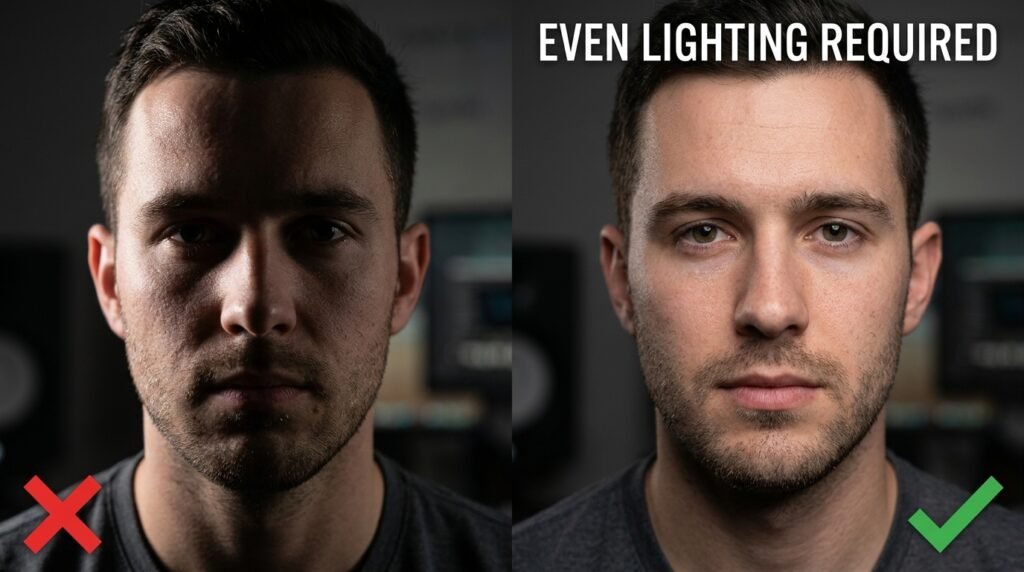
Every system that does live biometric capture, whether for a passport, a visa, or a national exam, runs some version of the same five checks. JAMB’s process follows that same general pattern, based on its own published guidance and the technical explanations it has given publicly.
1. Face position and size ratio
The camera needs your face centred and large enough in the frame, but not so close that your chin or forehead gets cut off. A face that’s too small, too far to one side, or tilted at an angle confuses the detection software, because it can’t map the standard set of facial points (eyes, nose bridge, mouth corners, ear positions) it needs for a clean read.
2. Lighting evenness
This is the one I watched trip up that candidate in Lagos. A single overhead light or a window behind you creates a bright patch on one side of your face and a shadow on the other. The system reads that as inconsistent data, since half your face looks different from the other half in terms of brightness and contour. Flat, even light from the front, not from above or behind, is what the camera actually needs.
3. Obstruction of facial landmarks
This covers glasses, caps, and any head covering that blocks the ears or hairline. JAMB has been explicit that both ears need to be visible during capture. Following a February 2026 incident at a CBT centre in Ekiti State, where a candidate’s hijab use sparked public concern, JAMB issued a clarifying statement: candidates are not required to remove their hijab. The simple requirement is that the ears be visible during photo capture, which can be done without removing the hijab itself. The Board described it as a standard technical step for facial recognition, comparable to passport and visa photo rules used internationally, rather than a religious restriction.
Glasses cause a separate, more mechanical problem. Frames can sit right across the upper part of the face where landmark points get measured, and lenses catch glare from ceiling lights or flash, which creates a bright spot the software reads as missing data. Removing glasses for the capture, even briefly, avoids this entirely.
4. Background uniformity
A cluttered or patterned background behind you (other candidates walking past, a poster on the wall, a curtain with a print) gives the face-detection algorithm more visual noise to sort through. Most CBT centres should already have a plain wall or fixed backdrop set up for this exact reason, but it’s worth a quick glance before you sit down. If the chair is angled so a doorway or window is right behind your head, ask if you can move slightly.
5. Resolution and sharpness floor
The camera and software at the centre need a sharp, well-resolved frame to extract facial detail accurately. A motion blur (you moved or spoke mid-capture), a smudged camera lens, or a low-quality webcam on an older centre setup can all push the image below that floor. This one’s mostly outside your control once you’re in the chair, but staying still and waiting for the operator’s countdown instead of anticipating it solves most of it.
The pre-capture checklist that pre-empts each rejection reason
I built this around the five checks above, because matching the fix to the actual failure point is what the generic “wear white and smile” advice misses entirely. Run through this before you sit in front of the camera.
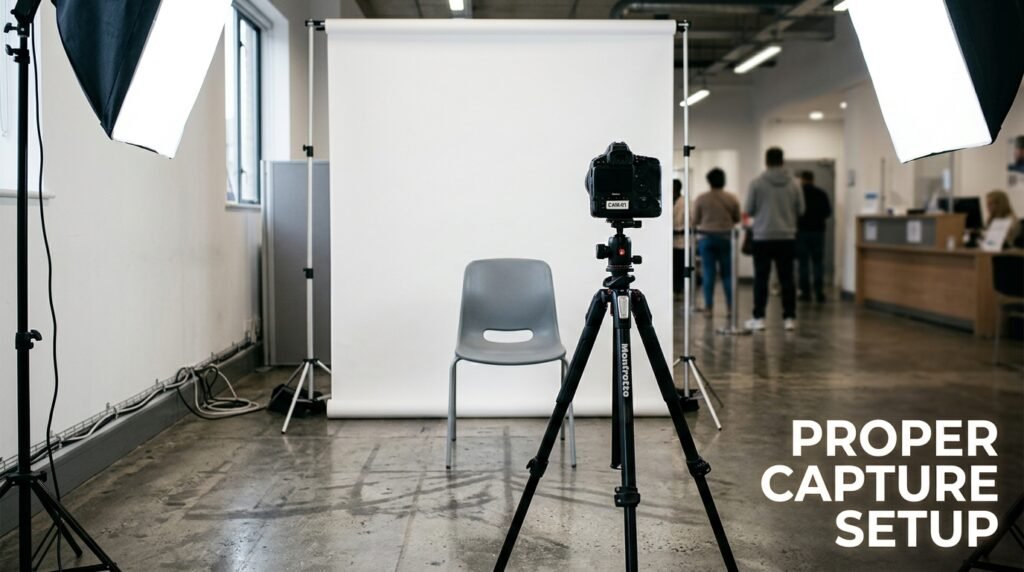
- Position: Sit square to the camera, chin level, eyes looking straight ahead. Don’t lean in close enough that the operator has to ask you to move back.
- Lighting: Avoid sitting directly under a single bright light or with a bright window behind you. If the room has uneven light, ask the operator if there’s a better-lit spot or angle.
- Glasses: Take them off for the capture unless you have a documented medical need to keep them on. Ask the operator if a brief removal is fine; it almost always is.
- Head covering: If you wear a hijab, niqab, or other head covering, adjust it ahead of time so both ears are visible without removing the covering. Practise this at home in a mirror so you’re not fumbling with it at the centre.
- Caps and hats: Remove any cap or hat with no religious basis. These almost always get flagged because they shadow the forehead and sometimes the eyes.
- Background: Glance behind you. If there’s clutter, a patterned wall, or people walking past right behind your seat, mention it to the operator before the shot is taken.
- Stillness: Wait for the operator’s cue and hold still for a second after. Don’t smile widely, talk, or blink right as the capture happens.
- Expression: Keep a neutral, relaxed face. You don’t need a forced smile, and an exaggerated expression can shift the geometry the software is trying to read.
JAMB photo capture compared with other biometric photo systems
It helps to see this in context, because the underlying technology isn’t unique to JAMB. Passport and visa systems run nearly the same checks, which is part of why JAMB itself has pointed to those systems when explaining its own rules.
| Check | JAMB biometric capture | International passport/visa photo capture |
|---|---|---|
| Where it happens | Live, at an accredited CBT centre, by an operator | Live, at a passport office or accredited photo agent |
| Candidate uploads own file | No | No, in most countries with biometric enrolment |
| Ears visible required | Yes, stated explicitly by JAMB in 2026 | Yes, standard requirement in most ICAO-aligned systems |
| Glasses allowed | Generally discouraged due to glare and landmark obstruction | Usually disallowed unless for a documented medical reason |
| Head covering for religious reasons | Permitted, ears must still be visible | Permitted, full face must still be visible, written declaration sometimes required |
| Background requirement | Plain, uniform background at the centre | Plain white or light-coloured background, controlled by the photo booth or photographer |
| Who fixes a bad capture | The centre operator, during the same session, by retaking it | The photo agent or office, often during the same session |
| Cost to correct after the fact | A data correction fee, payable through JAMB’s portal, plus a centre visit | Varies, but usually requires a new appointment and a new fee |
What happens if a bad photo slips through anyway
Sometimes a photo passes the capture step but turns out blurry, oddly lit, or just not great once you see it on your printed slip or admission documents. This happens more than people admit, because the operator is moving through dozens of candidates an hour and a borderline image can get waved through.
If that’s you, don’t panic and don’t try to “fix” it by registering again. JAMB has repeatedly warned that double registration ruins both records, since duplicate profiles get flagged and can void your application entirely. The correct route is JAMB’s official data correction process through the e-Facility portal, which covers passport photograph changes along with other profile details. Reported fees for this service have varied by cycle and by source, generally falling somewhere in the few-thousand-naira range, so check the current figure on JAMB’s own portal before you pay anything to a third party. Most photo or biometric corrections also still require a follow-up visit to an accredited CBT centre or JAMB office, since your fingerprint confirms the change.
One thing worth knowing upfront: this correction is typically a one-time allowance. Treat the first capture as the one that counts, not as a draft you can casually redo later.
Common bad advice that doesn’t match how the system works
A lot of guides tell candidates to prepare and upload a passport photograph before visiting the centre. That advice is outdated for how registration actually runs now. JAMB has stated plainly that the application can’t be completed without biometric and photo capture happening physically at the centre, and that no submission of a passport photograph replaces this step. Bringing a nice photo from home won’t help you skip the live capture, and centres that suggest otherwise aren’t following JAMB’s process.
Another common but shaky piece of advice: “just smile naturally and you’ll be fine.” A relaxed, neutral expression actually works better for facial recognition accuracy than a big smile, since a wide smile shifts the shape of your eyes, cheeks, and mouth in ways that can throw off the geometry the system is trying to lock onto. Save the smile for the graduation photo.
Frequently asked questions
Can I wear makeup for my JAMB photo capture? Light, natural makeup is fine. Heavy contouring or anything that changes your face shape on camera can interfere with the same landmark detection that flags poor lighting, so keep it minimal for this specific photo.
What if my centre’s camera looks low quality? You can’t swap out the centre’s equipment, but you can control your half of the equation: good lighting, a still pose, and a clear background. If the capture keeps failing on the same attempt, ask the operator to check the camera angle or lens before you sit for another retake.
Does skin tone or lighting bias affect facial detection accuracy? Lighting evenness matters more than skin tone for most modern detection systems, but uneven or warm-toned lighting can still create more contrast loss on darker skin tones, which is part of why flat, even lighting from the front works better for everyone sitting for this kind of capture.
If you’re heading to a CBT centre soon, practise the ear-visibility adjustment and the seated position at home first, in front of a mirror, so it’s automatic by the time you’re in the chair. That single rehearsal removes the two most common reasons candidates end up retaking the shot three or four times before it finally clears.