Cross River State College of Nursing Sciences Obudu
College of Nursing Obudu Admission List 2025/2026 Out

The management of the College of Nursing Sciences, Obudu has officially released the Community Midwifery Programme Admission List for the 2025/2026 academic session. All applicants who took part in the recent screening exercise can now check their names on the released list.

Checking the Admission List

The list of successful candidates for the Community Midwifery Programme has been published and attached to the college’s latest notice. Candidates are advised to go through the list carefully to confirm their admission status.


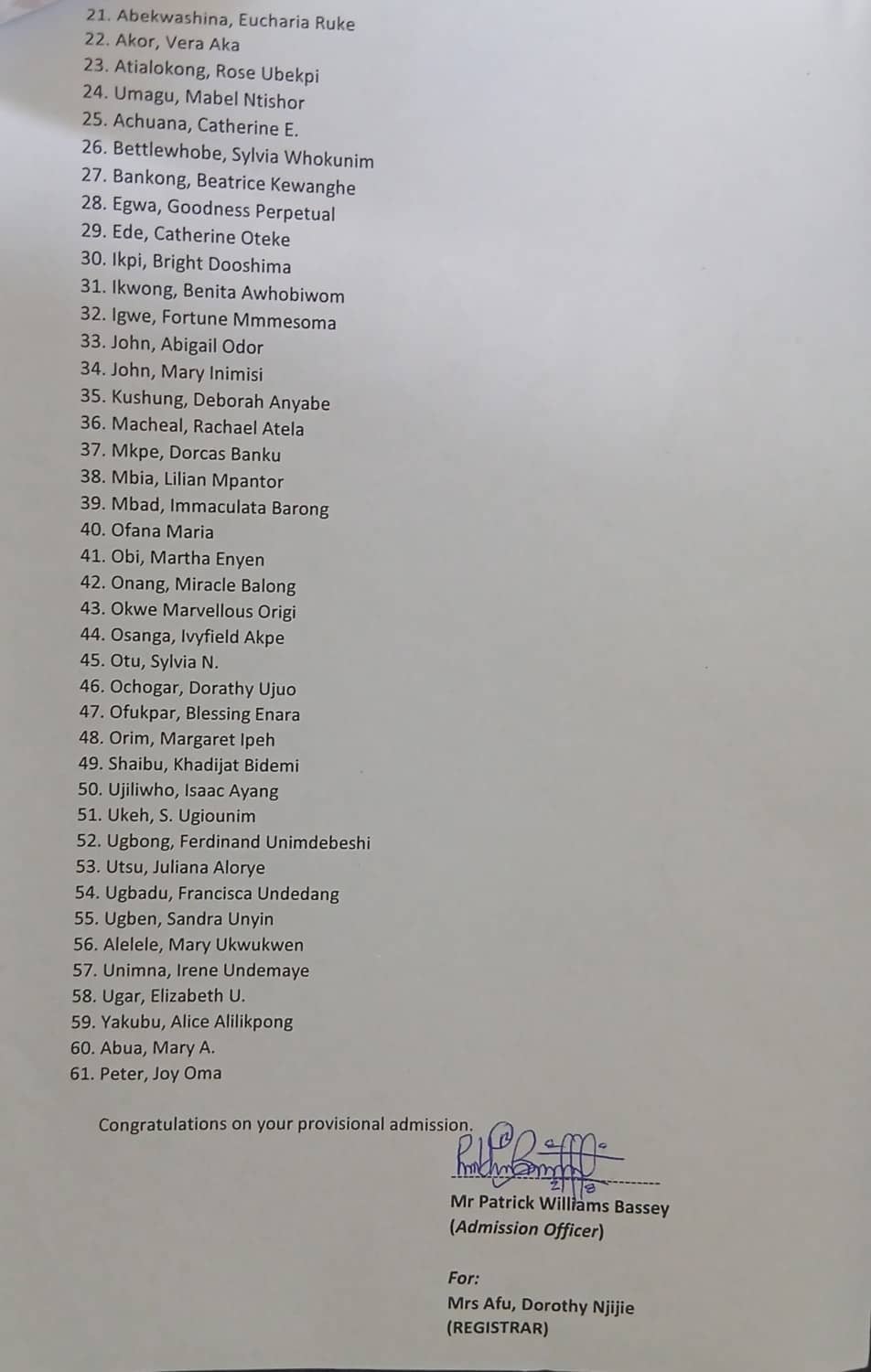
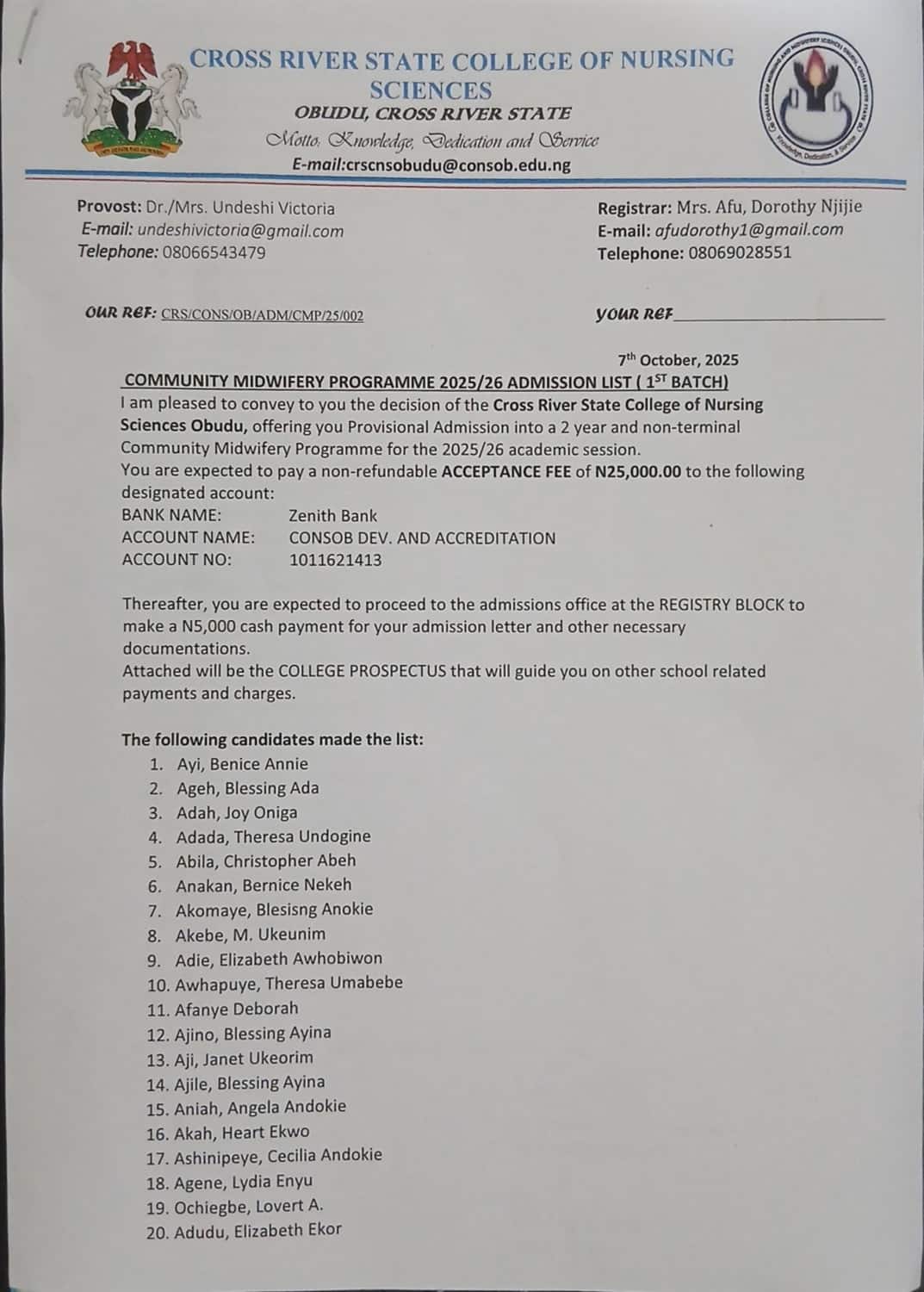
Cross River State College of Nursing Sciences, Obudu Community Midwifery Programme Admission List for 2025:2026 Academic Session 1st batch

Cross River State College of Nursing Sciences, Obudu Community Midwifery Programme Admission List for 2025:2026 Academic Session 1st batch continued

Once admitted, students should visit the College Admission Office for registration details, documentation steps, and payment information.

Acceptance Fee and Documentation

Successful candidates are to pay a non-refundable acceptance fee of ₦25,000 to the account below:

  • Bank Name: Zenith Bank
  • Account Name: CONSOB DEV. AND ACCREDITATION
  • Account Number: 1011621413

After payment, candidates must proceed to the Admissions Office at the Registry Block to make a ₦5,000 cash payment for the admission letter and other necessary documents.

Next Steps for Admitted Students

Newly admitted students should:

  1. Keep all payment receipts safe for registration.
  2. Follow instructions from the Admissions Office carefully.
  3. Begin documentation and registration as soon as possible.

The management encourages all successful candidates to complete these steps promptly to secure their place in the programme.

Admiralty University
Admiralty University (ADUN) Merit Admission List 2025/2026

The management of the Admiralty University of Nigeria (ADUN) has announced the release of the Admission List for the 2025/2026 academic session.

Candidates who applied for admission can now check their admission status through the JAMB Central Admission Processing System (CAPS) portal.


How to Check the ADUN Admission List

At the moment, admission status can only be viewed on the JAMB CAPS portal. Follow the steps below to confirm your status:

  1. Visit the JAMB E-Facility Portal.
  2. Log in with your JAMB username and password.
  3. Scroll down and select Check Admission Status.
  4. Click on Access my CAPS.
  5. Choose Admission Status to see if you have been offered admission into Admiralty University of Nigeria.

What the JAMB CAPS Responses Mean

  • ADMISSION OFFERED: You have been offered admission. Accept or reject the offer on the CAPS portal.
  • ADMISSION IN PROGRESS (AIP): Your application has been recommended and is awaiting final approval.
  • RECOMMENDED: Your admission is under review by JAMB for confirmation.
  • NOT ADMITTED: You haven’t been offered admission yet. The school may still be processing lists.
  • PENDING: Your application is still being reviewed.

Next Steps After Admission

If your admission status shows “ADMISSION OFFERED,” you must:

  1. Accept or reject the offer using biometrics at an approved JAMB CBT Centre or by sending ACCEPT or REJECT to 55019 or 66019 from your registered phone number.
  2. After accepting, print your JAMB Admission Letter as proof of admission.

Note: If you are checking your admission on a mobile device and the page doesn’t load fully, switch your browser to desktop mode. The Chrome browser is recommended for this.

Help and Support

For any issues or questions about your admission, contact the Admissions Desk at the university. Staff members are available to assist with verification and further steps.

Sa'adu Zungur University SAZU
Check SAZU (BASUG) Merit Admission List 2025/2026 Online

The long wait is over. Sa’adu Zungur University (SAZU), formerly known as Bauchi State University, Gadau (BASUG), has released the Admission List for the 2025/2026 academic session. The first, second, and third batches are now available. This marks the start of an exciting new phase for many students who have been eagerly waiting to begin their studies.

How to Check the SAZU Admission List

You don’t have to visit Gadau in person. The lists are live on the university’s website and easy to access


All you need is a reliable internet connection and your application details. Take a deep breath, click the link, and see if your name is there.

Next Steps After Seeing Your Name

Getting admitted is a big win, but your admission is only complete after a few key steps.

1. Attend the Physical Screening

Bring all required documents for your screening. If you’re unsure of what to take, review the SAZU screening guidelines before heading to campus.

2. Confirm Your Admission on JAMB CAPS

Visit the JAMB CAPS portal and either accept or reject your offer. Do not leave it pending. Without formal acceptance, your admission remains incomplete.

3. Print Your JAMB Admission Letter

After acceptance, print your letter from the JAMB Admission Letter portal. You’ll need this document at every registration and clearance point, so keep it safe.

If You’re Not on the SAZU Admission List Yet

Don’t worry if your name isn’t on the first set of lists. More batches may still come out. Keep checking both the SAZU website and JAMB CAPS. Patience pays off, and sometimes your name appears later than expected.

Sokoto State University SSU
SSU 1st bacth Merit Admission List 2025/2026 Out – Pdf

The SSU Admission List for the 2025/2026 academic session is now out.

Sokoto State University has published the first batch of admitted candidates. If you took part in the post-UTME screening, you can now check your admission status and begin your next steps.


How to Check the SSU Admission List

You can find the first batch list on the official Sokoto State University admission list PDF.

If your name appears on the SSU Admission List, here’s what to do next:

  1. Go to the JAMB CAPS portal to accept or reject your admission.
  2. Once you’ve accepted, print your JAMB admission letter.
  3. If you haven’t uploaded your O’Level results (WAECNECO, or NABTEB), do so immediately through the JAMB result upload page. This helps the university finalise your admission process.

What to Do After Confirmation

After confirming your admission, prepare for registration and other requirements from the university. Keep your documents handy and follow updates from the school for information on clearance, accommodation, and resumption dates.

Congratulations to all successful candidates whose names appear on the Sokoto State University admission list. This is the start of an exciting academic experience. Make sure to complete your registration early and get ready for a great year at SSU.

Ekiti State University EKSU
EKSU 1st Batch Merit Admission List 2025/2026 Out

The management of the Ekiti State University (EKSU) has released the admission list for the 2025/2026 academic session


The admission list contains the names of candidates offered provisional admission into EKSU various degree programmes for the 2025/2026 academic session.

Candidates who applied for the post-UTME can now check their admission status online.

How to Check EKSU Admission List

  1. Go to the EKSU Admission Status Portal eksuportal.eksu.edu.ng/check_admission.
  2. Select your exam year, i.e. “2025/2026”.
  3. Choose your application type i.e. “Post UTME”.
  4. Enter your JAMB Registration Number in the required field.
  5. Click the “Check Status” button to see your admission result.

You can also follow the method outlined below to access your admission status on EKSU portal

  1. Go to EKSU Admission Portal at eksuportal.eksu.edu.ng/login.
  2. Enter your JAMB Registration Number as your Username.
  3. Use “password1” as the default password.
  4. Log in to view your admission status.

Successfully admitted candidates are to do the following:

If you’re yet to be admitted, remain hopeful and keep checking the JAMB portal and EKSU’s website for updates on your status.

Congratulations to all the candidates that made it to EKSU amdission list.


Modibbo Adama University, Yola MAUTECH
MAUTECH 1st Batch Merit Admission List 2025/2026 Out

The Modibbo Adama University of Technology (MAUTECH) has released its 2025/2026 Admission List. Candidates who took part in the Post UTME screening can now check their admission status on the JAMB CAPS portal. Follow the steps below to confirm your status and see what’s next for you.

So, the wait is finally over. MAUTECH has dropped its admission list for the 2025/2026 academic session, and for many students, this moment feels like the end of a long, anxious journey. Remember those days of refreshing pages and double-checking credentials? Well, it’s time to see if your name made it to the big list.

How to Check MAUTECH Admission List on JAMB CAPS

Let’s not beat around the bush. You can only view your admission status through the JAMB CAPS portal for now. If that sounds a bit techy, don’t worry — the process is pretty simple.


Steps to Check

  • Head over to the JAMB e-Facility portal.
  • Log in with your JAMB username and password.
  • Scroll down until you spot ‘Check Admission Status’.
  • Hit ‘Access my CAPS’.
  • Then click on ‘Admission Status’ to see if you’ve got that sweet “Offered Admission” message.

Some folks using mobile phones might get stuck with just a “Welcome” screen. Don’t panic. Just switch your browser to desktop mode (Chrome works best) and reload the page. That usually does the trick. Na small thing.

What the Different Admission Messages Mean

When you check your status, the message you see tells a story. Here’s how to read it:

1. Admission Offered

Big congratulations! You’ve been officially admitted. You can now decide to accept or reject the offer on your CAPS portal.

2. Admission in Progress (AIP)

This one means your school has seen your application and liked what they saw. They’ve pushed it up for final approval. It’s still in the works, so hang tight.

3. Recommended

You’ve been recommended for admission, but JAMB still needs to give the green light. Kind of like waiting for the final “yes” from the big boss.

4. Not Admitted

Oof. This simply means you haven’t been selected yet. Maybe the school hasn’t rolled out all its lists or your turn is still in review. Don’t lose hope; these things come in batches.

5. Pending

Your file is still under review. Nothing’s final yet, so you might still get that call-up.

What to Do After You Get Admitted

If you’ve got an admission offer, don’t waste time.
Send ACCEPT or REJECT to 55019 or 66019 from the phone number you used to register for JAMB. After accepting, go on and print your JAMB admission letter for record-keeping.

A little reminder: always double-check your details before sending that text. You don’t want to accept or reject by mistake. That’d be wahala you don’t need.

A Quick Tip for Mobile Users

Like I mentioned earlier, if you can’t see your admission status on your phone, don’t stress. Open your Chrome browser, tap the three dots, and choose ‘Request Desktop Site’. The full page will appear, just like on a laptop. Problem solved.

Emmanuel Alayande University of Education (EAUED)
Emmanuel Alayande University Admission List 2025/2026

Emmanuel Alayande University of Education (EAUED) has released its 2025/2026 admission list. Candidates can now check their admission status on the school portal and the JAMB CAPS website. Those offered admission should act quickly to secure their place.

So, the wait is over at last. Emmanuel Alayande University of Education (EAUED) has dropped its admission list for the 2025/2026 academic session, and you can almost hear the sighs of relief from thousands of hopeful students across the country. If you sat for the Post UTME and have been refreshing your browser like it owes you money, this is your moment.

How to Check the EAUED Admission List

The university has officially announced that the first batch of the admission list is now available online. All you have to do is log into your EAUED admission portal to check your status.


It’s simple, really, but here’s a quick rundown:

  • Visit the EAUED e-portal using the link above.
  • Enter your login details — the same ones you used during application.
  • Check for your admission status under the “Admission List” section.

If your name pops up, go ahead and breathe. You did it!

Acceptance Deadline and Important Dates

Now, don’t get too relaxed yet. Those who’ve been offered admission have until Friday, 10 October 2025, to accept the offer by paying their acceptance fees. Think of it as securing your seat before someone else takes it.

Any candidate who fails to pay by that date automatically loses the admission. The school won’t call to remind you, and your slot could easily be given to someone waiting in line. E no go funny if you delay.

For Those Not Yet Admitted

Didn’t see your name this round? Don’t lose heart. The university has kept the door open a little longer. You can still log into your portal to change to another course or programme where spaces remain. The good part? No extra payment is needed for this adjustment.

Also, the portal has been reopened for new applicants and those waiting for a second chance to apply for available programmes. So, keep your documents ready and stay alert for the next batch.

What to Do After You’re Admitted

If your name made the list, here’s what you should do next to make it official:

  • Accept or Reject the Offer: Head to the JAMB CAPS portal and either accept or reject your admission.
  • Print Your JAMB Admission Letter: Once you’ve accepted, print your letter from the JAMB Admission Letter portal. Keep it safe; you’ll need it later for clearance.

Simple steps, but very important ones. Miss any, and you could mess up what you’ve worked hard for.

Checking Your EAUED Admission Status on JAMB CAPS

There’s another way to confirm your admission — through JAMB CAPS. If you prefer that route, here’s what to do:

  • Go to the JAMB e-Facility portal.
  • Log in with your JAMB details.
  • Scroll to find “Check Admission Status”.
  • Click “Access my CAPS.”
  • Tap “Admission Status.”

And there you go. If it says “Admission Offered,” congrats, your spot is waiting.

Federal University of Technology Ikot-Abasi FUTIA
Check FUTIA Merit Admission List 2025/2026 @https://portal.futia.edu.ng/

Federal University of Technology, Ikot Abasi (FUTIA) has announced the 2025/2026 admission list. Applicants can now confirm their admission status on both the FUTIA and JAMB CAPS portals. Please read through for full checking steps, required documents, and registration dates.

It’s that time again. The air feels heavy with both nerves and joy as the FUTIA Admission List finally drops for the 2025/2026 academic year. You can almost hear the collective sigh of relief across hostels and homes. For some, this is the long-awaited “yes” after months of refreshing pages and clutching hope like a lifeline. For others, it’s a moment to brace for what comes next.


Let’s talk about what this means, how to check it, and the steps to take once you see your name smiling back at you.

How To Check The FUTIA Admission List

Here’s the thing — the list is out, and there are two ways to find your name. You can either check through the FUTIA Portal or through JAMB CAPS. Both give you the same result, so pick whichever suits you best.

Checking via JAMB CAPS Portal

Follow these steps carefully:

  • Go to the JAMB E-Facility Portal
  • Log in with your JAMB username and password
  • Scroll till you see Check Admission Status
  • Click Access my CAPS
  • Tap Admission Status to see if your name made the cut

If you’re using a phone, you might not see everything on the screen at first glance. No stress. Open Chrome, click the options icon, and pick Request Desktop Site. It’ll show the full page. Easy.

Checking via FUTIA Portal

You can also check directly on the FUTIA Admission Portal. Once logged in, your admission status will be displayed there too. Whichever way you go, the result is the same.

Understanding What You See on JAMB CAPS

Now, JAMB CAPS gives different messages. Here’s how to make sense of them:

  • Admission Offered: Big congratulations! JAMB has confirmed your spot. You can now accept or reject it on CAPS.
  • Admission in Progress (AIP): The school has sent your name for final approval. You’re on the waiting lane, but things are moving.
  • Recommended: The university has picked you, and JAMB is doing its cross-check.
  • Not Admitted: Don’t panic yet. FUTIA releases admission in batches, so yours might be coming in the next one.
  • Pending: Your application is still being reviewed. Patience is key here.

What To Do After Getting Admitted

Once you see that sweet “Admission Offered,” it’s time to act fast.

  • Send ACCEPT or REJECT to 55019 or 66019 from the phone number you registered with JAMB.
  • Print your JAMB Admission Letter.
  • Then, hop over to the FUTIA Portal to pay your Acceptance Fee.

Yes, it’s a lot of clicking and logging in, but better do it early than face wahala later.

FUTIA Screening and Registration Details

FUTIA has scheduled its Screening and Registration Exercise at the University Lecture Theatre, Takeoff Campus, Ikot Abasi. It starts on Monday, 6th October and ends on Monday, 20th October, 2025. The time is 9 a.m. daily.

Things To Bring Along

Don’t leave these behind. Seriously, double-check your bag.

  • Acceptance Fee Receipt
  • Original JAMB Result
  • Original JAMB Admission Letter
  • O’level Result(s)
  • First School Leaving Certificate (FSLC)
  • Birth Certificate or Age Declaration
  • Twelve recent passport photographs
  • Attestation Letter (from a clergy, senior civil servant, or village head)
  • Certificate of Origin
  • FUTIA Bio-Data / Application Form
  • FUTIA Screening Fee Receipt

Better safe than sorry, right?

If Your Name Isn’t There Yet

Relax. FUTIA releases its admission list in batches, so if you don’t see your name yet, keep checking your JAMB CAPS regularly. It’s easy to lose patience, but sometimes the system just needs more time to update.

And if after several tries nothing changes, you can visit the Admissions Officer at the university to ask questions directly. No shame in that, abeg.

Stay Alert, Avoid Scams

One small warning, please. FUTIA does not use any admission agents. No one is authorised to collect money outside of the official portal payments. If anyone promises to “help” you with admission for a fee, just know say e be scam. Protect your money and your peace of mind.

IMSU
IMSU 1st Batch Merit Admission List 2025/2026 Out

The Imo State University (IMSU) has officially released its admission list for the 2025–2026 academic session. All candidates who sat for the post-UTME are urged to check their status and follow the next steps to confirm their offer. Read on for how to check and what to do after seeing your name.

So, the waiting game is finally over. Imo State University, fondly called IMSU, has dropped the admission list for the 2025–2026 academic year. For many students, this is that heart-pounding moment when all the late nights and stress either pay off or stretch a little longer. If you’ve been refreshing the portal every other day, well, this might just be your lucky break.


Checking Your IMSU Admission Status

Here’s how to find out if your name made the cut:

  • Head straight to the IMSU admission checking portal.
  • Type in your JAMB registration number, no mistakes please.
  • Click the Check button and wait a few seconds.

That’s it. Your status will appear on the screen—either a sweet “Congratulations” or a gentle “Not yet admitted.” Don’t panic if it’s the latter. Sometimes, lists get updated in batches. So, chin up and keep checking.

If You’ve Been Admitted, What Next?

First off, congrats! Getting into IMSU isn’t beans. Here’s what to do right away:

  • Accept or Reject the Offer – Visit the JAMB CAPS portal to either accept or decline your admission. Don’t skip this part, it’s key.
  • Print Your JAMB Admission Letter – Once accepted, print your official letter from the JAMB Admission Letter portal. Keep it safe, like your life depends on it, because, well, it kind of does for registration.

Some students forget to confirm on CAPS and later wonder why their names vanish from the list—don’t be that person. Better to handle it while the system’s still hot.

Checking Through the JAMB Portal Too

You can double-check your status directly on JAMB’s site, just to be sure everything tallies:

  • Go to the JAMB E-Facility portal.
  • Log in with your username and password.
  • Scroll down and click Check Admission Status.
  • Tap Access my CAPS.
  • Finally, click on Admission Status to see if IMSU has offered you a spot.

It’s always good to confirm from both ends—IMSU’s portal and JAMB’s. Two heads are better than one, right?

Federal University of Kashere, FUKASHERE
Check FUKASHERE Merit Admission List 2025/2026 – Pdf

Federal University of Kashere (FUKASHERE) has released the admission list for the 2025–2026 academic session. All UTME and Direct Entry candidates who took part in the screening can now check their status and begin registration online. Kindly read through for full steps on how to confirm your admission and complete all required actions.

Finally, some good news for students who’ve been glued to their phones for weeks, refreshing like it’s a full-time job. The Federal University of Kashere (FUKASHERE) has officially released its admission list for the new academic session. Both UTME and Direct Entry candidates are covered, so if you took part in the screening, this might just be your moment.


Funny thing—each year, it’s the same story. Students checking, rechecking, then calling friends just to confirm if the portal’s really updated. This time though, the wait is over for real.

How to Check the FUKASHERE Admission List

The first batch admission list is out and open for everyone to view. Here’s how to find your name without stress:

  • Visit the FUKASHERE admission list PDF.
  • Scroll carefully through the list—don’t rush, names can hide in plain sight.
  • If you find yours, take a deep breath and smile. You’ve made it.

A few people might not see their names yet, and that’s okay. Admission lists often come out in batches. Keep checking, as another round might just carry your name. Patience no be curse, as they say.

What to Do If You’re Admitted

Alright, you’ve seen your name, what next? Don’t just relax yet, there are a few important steps to lock it in:

  • Go to the FUKASHERE Admission Portal to accept your admission and print your university admission letter.
  • Head over to the JAMB CAPS portal to either accept or reject your offer officially.
  • After that, print your JAMB Admission Letter as proof of admission. Keep a copy—it’ll save you from plenty of wahala later.

It’s best to get these done early, before the online system starts acting funny. You know how these portals can behave when everyone rushes in at once.

Checking Your FUKASHERE Admission Status on JAMB

You can also confirm through JAMB, just to be double sure everything matches. Follow these quick steps:

  • Go to the JAMB EFacility website.
  • Log in with your JAMB username and password.
  • Scroll down, click on Check Admission Status.
  • Select Access my CAPS.
  • Finally, hit Admission Status to see if you’ve got the offer from FUKASHERE.

Doing this helps you avoid surprises later when it’s time for registration.

Important Reminders

Before you rush off, take note of these two key points:

  • Clearance and issuance of PIN is totally free. Don’t pay anyone claiming otherwise.
  • Online registration begins on 6th October, 2025. Mark that date somewhere safe—missing it could delay your start.